Table of contents
- Quick verdict
- Research methodology
- What is CinematicWeb AI?
- How the workflow is supposed to work
- Official demo status
- Features and edition boundaries
- A practical first-project plan
- Pricing, upgrades and total cost
- Bonuses and coupon
- Pros and cons
- What it does not establish
- Commercial rights and client work
- Privacy and account safety
- Alternatives
- Who should buy or wait?
- Legitimacy, reviews and complaints
- Guarantee and support
- Frequently asked questions
- Final verdict
- Related guides and disclosure
CinematicWeb AI review: the quick verdict
CinematicWeb AI is worth evaluating as a low-cost website experiment, but the available evidence does not justify treating it as a proven replacement for an established business website platform.
Its strongest advertised proposition is combining AI page creation, graphics, copy and motion in one hosted workflow. This could help a freelancer produce an initial visual concept without assembling several tools. Its biggest practical limitation is that the features many business buyers need are spread across upgrades, while the base edition's exact usage allowance and website portability remain unclear.
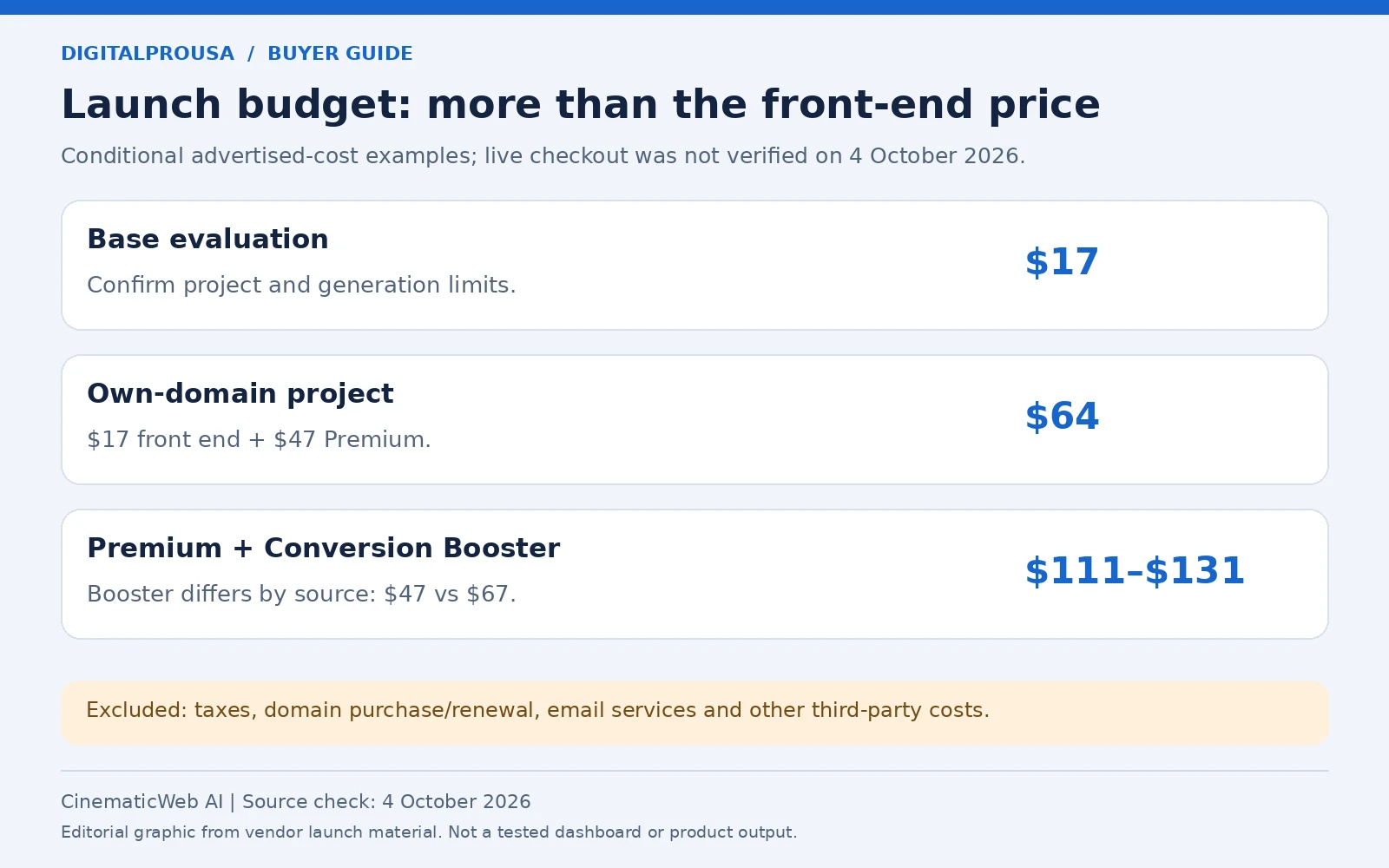
For a site on your own domain, the advertised starting combination is $17 + $47 = $64, before domain registration, taxes and any additional services. That is an illustrative launch calculation, not a confirmed checkout total.
| Assessment area | Evidence-based assessment |
|---|---|
| Feature set | Broad on paper; edition boundaries matter |
| Ease of use | Unassessed: no usable walkthrough or account test |
| Value | Conditional on Premium requirements and actual limits |
| Transparency | Mixed: detailed launch descriptions, but conflicting funnel details |
| Performance and reliability | Unassessed: no live project or field measurements |
Do not buy the entire funnel to resolve questions that should be answered before purchase. Request the base allowance, domain entitlement, export terms and written refund conditions first.
How this review was researched
Launch context: Scheduled for October 5, 2026. Advertised prices below are launch figures, not checkout-confirmed charges. This assessment was checked October 4, 2026.
This is a source-based pre-launch assessment, not a hands-on review. We read the supplied official JV page and promotional Google Doc on October 4, 2026, inspected their feature and funnel descriptions, attempted to open the sales preview and affiliate destination, and checked current official material for Framer, Webflow, Wix and WordPress.
The official preview returned HTTP 404 during this research. The supplied affiliate URL returned HTTP 403 from the research environment; its destination and checkout were therefore not verified. Neither response establishes what every visitor will experience.
Product specifications below are attributed to the vendor's October 4 launch material. Comparisons and project checklists are editorial analysis. No generation speed, conversion improvement, earnings, security implementation or refund outcome was independently demonstrated. AI assisted research organization and drafting. No private dashboard access or independent product testing was used. Our review methodology and sources policy explain the site's approach.
What is CinematicWeb AI?
CinematicWeb AI is marketed as hosted software that turns an idea, niche or keyword into a website with generated layouts, content, visuals and animation. It is not presented as a WordPress theme, a downloadable website template or a web-design course.
In this context, “cinematic” describes the intended visual experience: animated sections, scrolling effects and more elaborate motion. It does not establish that every generated website will be fast, accessible or more effective at converting visitors.
| Product detail | What the sources establish |
|---|---|
| Product | CinematicWeb AI; launch edition, no numbered version confirmed |
| Named promoter/vendor contact | Kundan Choudhary in the official launch material |
| Access | Advertised cloud-based browser access |
| Main job | Generate and publish visually led websites from prompts |
| Target audience | Vendor targets freelancers, agencies, creators and small businesses |
| Entry price and billing | Advertised $17 at launch; one-time payment and lifetime access claimed |
| Usage allowance | Exact front-end project, generation and publishing limits not specified |
| Domains and branding | Custom domain integration and branding removal listed under Premium |
| Export and migration | Ordinary website source-code export and migration rights not confirmed |
| Guarantee | Advertised 30-day money-back period; complete conditions unverified |
| Support | Vendor contact identified; verified customer support portal not located |
“Lifetime access” should be read alongside the service terms. It does not itself guarantee that hosting, AI processing or future upgrades will remain available indefinitely.
How is CinematicWeb AI supposed to work?
The advertised workflow is describe, generate, customize and publish. The following sequence interprets the vendor's descriptions; it is not a verified dashboard tutorial.
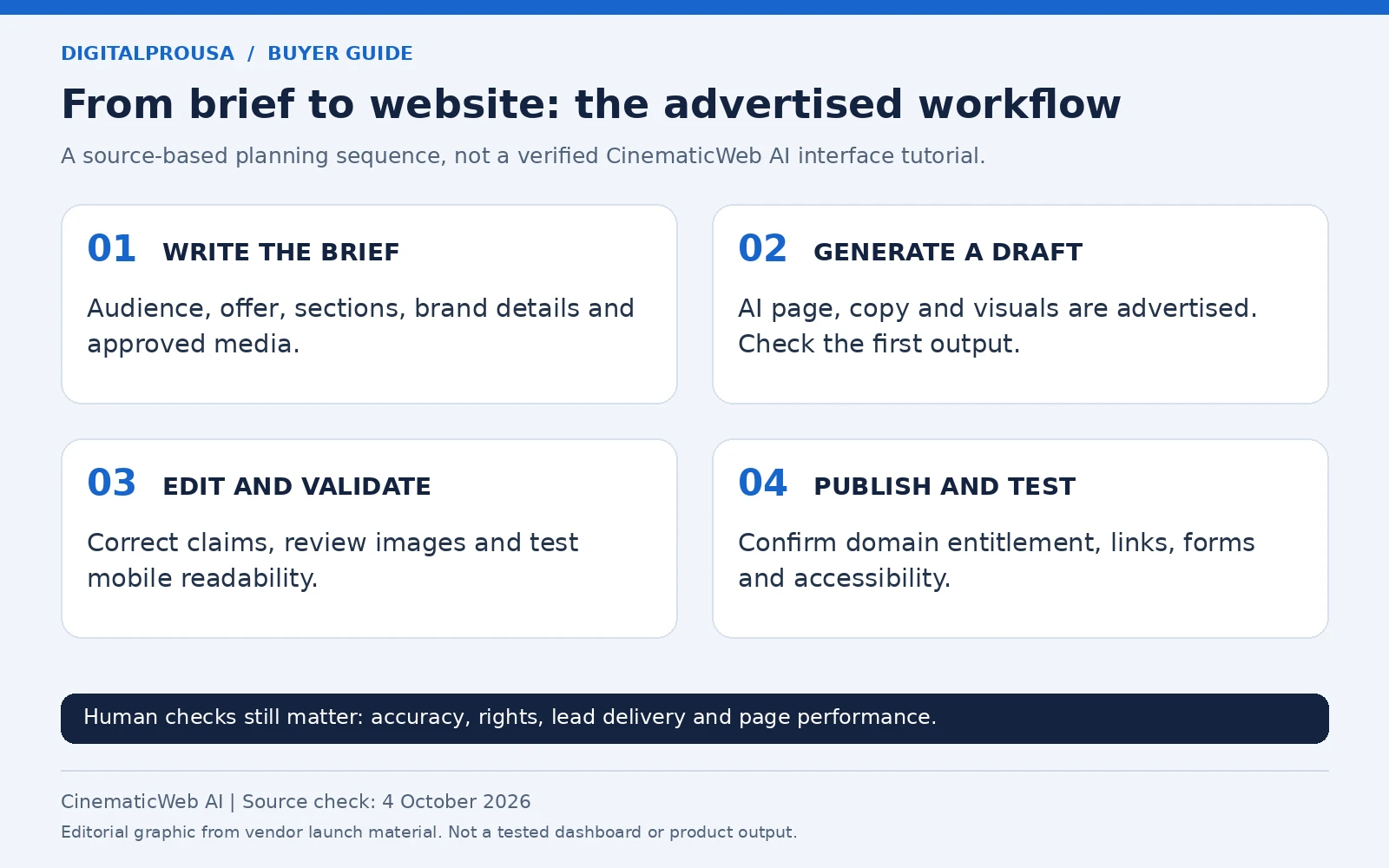
- Prepare a website brief. Specify your audience, offer, intended pages, brand colors, approved images and the action visitors should take.
- Generate the first draft. The seller says the system creates layout, copy and visual assets from an idea or keyword. The quality of the initial draft has not been tested.
- Edit and validate. Replace invented business details, generic promises and unsuitable images. Confirm whether the edition allows the exact revisions you need; granular editing controls are not documented clearly enough to assume.
- Choose publishing settings. Check the domain, branding, SSL and integration entitlements. The launch material places custom domain integration in Premium rather than clearly including it in the front end.
- Review the published result. Test mobile layout, form delivery, keyboard navigation, links and performance before directing customers to the site.
A generated page is an intermediate deliverable. Business accuracy, permission to use media and actual lead handling remain your responsibilities.
Is there an official CinematicWeb AI demo?
No playable official demo was verified on October 4, 2026. The supplied Google Doc says “Coming Soon.” The JV page's Vimeo player has no video identifier, so it cannot substantiate a working walkthrough.
We have omitted a broken video player. When a real demonstration becomes available, check whether it shows the purchased edition, a published custom-domain website, successful form submission, mobile behavior and editing after publication. A polished demonstration still would not establish typical reliability.
CinematicWeb AI features: what belongs to each edition?
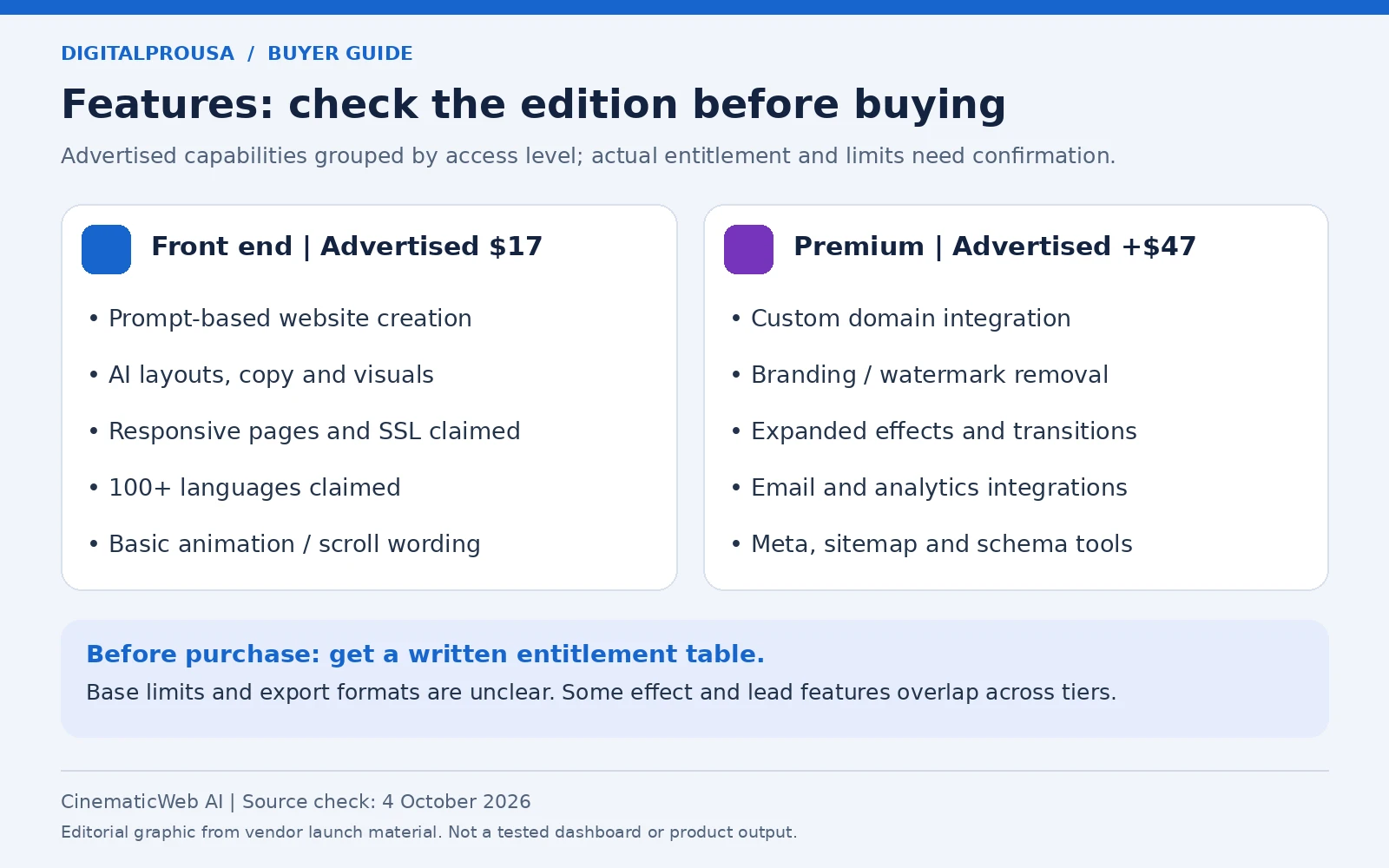
The advertised feature list is extensive, but a feature being mentioned somewhere in the funnel does not mean it is included in the $17 edition. Source: vendor JV page and Google Doc, checked October 4, 2026.
| Capability | Advertised location | Practical use | What to verify |
|---|---|---|---|
| Prompt-based website generation | Front end | Create a first draft for a portfolio or offer | Page count, generation allowance, editing controls |
| Layouts and AI copy | Front end | Draft sections and page text | Accuracy, revision limits and content ownership |
| AI graphics and visual assets | Front end | Create supporting imagery | Resolution, download formats and rights |
| Responsive layouts and SSL | Front end | Publish for different devices with encrypted connections | Actual mobile rendering and certificate behavior |
| 100+ languages | Front end claim | Produce localized page drafts | Supported languages, translation quality and language-specific SEO |
| Basic animations and scroll effects | Front end wording | Add movement to selected sections | Exact effects available without upgrades |
| Domain connection and branding removal | Premium | Use a branded business address | Number of domains and branding scope |
| Parallax, 3D, video backgrounds, transitions | Premium | Build richer visual experiences | Controls, browser behavior and reduced-motion fallback |
| Email tools and analytics connections | Premium | Connect leads and measurement | Real integrations, account permissions and setup requirements |
| Titles, descriptions, sitemap and schema tools | Premium | Manage technical discovery signals | Editable output and correct published markup |
| Forms, popups, follow-up and conversion tracking | Conversion Booster; some lead tools also mentioned in Premium | Capture and follow up with inquiries | Which edition supplies which functions and email-delivery costs |
| Image, code, caching and video optimization | Speed Optimizer | Address performance problems | Actual diagnostics and measured improvement |
| Keyword, link and SEO tools | Traffic Booster | Assist research and maintenance | Data source, implementation and restrictions |
| Account resale and own-brand software | Agency, Reseller and WhiteLabel editions | Operate a software service | Contract, support obligations and hosting responsibility |
There are overlaps: front-end copy mentions scroll effects, while Premium also lists scroll effects; lead management appears in several editions. Ask for a written entitlement table rather than assuming every repeated feature unlocks at the lowest price.
The Unlimited description also contains a video/audio podcast line that does not fit the main website-building proposition. We do not treat that line as confirmed podcast functionality.
The practical gaps to resolve before business use
The current material does not adequately document several operational requirements. These matter more than another animation preset when the website must support a real business:
| Requirement | Question to resolve | Why it matters |
|---|---|---|
| Page and hosting limits | How many websites, pages, domains and monthly visits does the base purchase cover? | Site-generation access is not necessarily unlimited hosting. |
| Content management | Can you publish recurring blog posts, manage collections and edit navigation without rebuilding? | A visual landing page and an ongoing publishing site need different controls. |
| Commerce and booking | Are payments, inventory or appointment scheduling native, embedded or unsupported? | A generated sales section alone does not establish a functioning store or booking system. |
| Versioning and rollback | Can a previous published version be restored? | A faulty AI revision should not leave the business without a working site. |
| Portable output | Can you export the website, its media and captured leads in usable formats? | Ownership should include a workable exit route, not just continued access. |
| Hosting continuity | What happens to published sites if your account or the service ends? | One-time software payment does not resolve the long-term hosting obligation. |
| Language publishing | Does each language have its own URL, editable translation and metadata? | A language-count claim does not prove a complete multilingual website implementation. |
These are unresolved requirements, not confirmed missing features. Ask for documentation or a demonstration of the exact entitlement before making a promise to a client.
A practical first-project plan
Use a small project to verify the features you need before relying on the platform for client delivery. This is an editorial test plan, not a tested CinematicWeb AI procedure.
Start with an ordinary business brief
Example prompt, written for this review rather than generated by the product:
Create a three-section website for a freelance product photographer. The audience is small online stores. Use a short services introduction, a portfolio area using supplied images, and a contact section. Keep text readable on mobile. Use subtle optional motion and preserve content when motion is reduced. Do not invent testimonials, client logos, prices or awards.
The acceptable outcome is not simply an attractive screenshot. The page should communicate the offer, load reasonably, keep important information visible and deliver a real inquiry. Ask the vendor for a published sample in the edition you intend to buy, rather than judging only a screenshot.
Test in a useful order
First verify that the generated copy is accurate and editable. Next check whether the needed image and layout changes can be made without regenerating unrelated sections. Then test publication, domain connection if purchased, and form delivery to a real inbox. Finally inspect phone layouts, keyboard access, reduced motion and performance.
Save screenshots and an entitlement record. If a required feature does not work, contact support with the project URL, edition, browser, steps and expected behavior while the advertised refund window remains open.
For a fuller motion-focused workflow, see our guide to animated websites without coding.
CinematicWeb AI pricing, OTOs and realistic project costs
The front end is advertised at $17, but the funnel is not sufficiently consistent to present every upgrade price as checkout-confirmed. Both official sources were checked October 4, 2026. The Google Doc lists 11 upgrades; the JV page lists 10 and omits a separate Monetization row.
| Edition | Google Doc figure | JV page figure | Buyer relevance / can a beginner skip? |
|---|---|---|---|
| Front end | $17 | $17 | Entry website-generation access; clarify limits |
| Premium | $47 | $47 | Domain, branding and expanded tools; relevant for own-domain work |
| Unlimited | $97–$167 | $97 | Higher-volume entitlement; skip until base limits are known |
| DFY Website Empire / Done-For-You | $197 | $197 | Setup assistance; skip unless a defined service scope is needed |
| Automation | $47 | $47 | Additional workflow automation; skip without a specific task |
| Conversion Booster | $67 | $47 | Lead capture and follow-up; price conflict needs checkout confirmation |
| Speed Optimizer | $47 | $37 | Optimization tooling; buy only after diagnosing a real problem |
| Traffic Booster | Not stated | $47 | Research and link tools; not guaranteed traffic |
| Monetization | $47 | No separate row | Revenue-oriented tools; scope insufficiently described |
| Agency | $197; unlimited users described | $97–$197; 50/unlimited users described | Account management/resale; skip for a personal website |
| Reseller | $197 | $197 | Software resale rights; different from building client websites |
| WhiteLabel | $497 | $497 | Own-brand software code/service; hosting and contract need review |
Upgrade numbers are intentionally omitted because their numbering conflicts between the two sources. No current order bump, Fast Pass, bundle price or complete downsell schedule was verified. The Google Doc mentions a $3 front-end downsell reduction but supplies no publicly confirmed coupon code or checkout conditions.
Budget for the job, not the headline price
| Illustrative scenario | Advertised-cost arithmetic | What it does not include |
|---|---|---|
| Evaluate base generation | $17 | Taxes and unspecified service limits |
| Own-domain, unbranded project | $17 + $47 = $64 | Domain registration/renewal and other service fees |
| Premium plus Conversion Booster | $17 + $47 + $47–$67 = $111–$131 | Email-service costs, taxes and any edition dependencies |
| Premium plus Unlimited | $17 + $47 + $97–$167 = $161–$231 | Whether these editions stack or require additional purchases |
These are conditional scenarios, not recommended carts. We could not verify whether a higher tier includes lower-tier entitlements, so avoid assuming every upgrade must be bought separately or that one upgrade replaces all others.
Domain registration is distinct from domain connection. An email platform may charge for subscribers or sending even if an integration is included. WhiteLabel deployment can introduce server and maintenance costs. No mandatory external AI API charge was confirmed; do not infer that all third-party costs are zero.
For a broader budgeting checklist, see AI website builder hidden costs. Compare required features, not just the lowest advertised entry price.
CinematicWeb AI bonuses and coupon: what is confirmed?
No named buyer bonus inventory or usable public coupon code was verified. The supplied Doc includes a general bonus-resource reference, but that does not establish which items a customer receives with this purchase, their license or their independent market value.
Affiliate prizes and commission incentives are not customer bonuses. We have not added a personal bonus package or claimed inflated bonus values.
The advertised $3 front-end downsell reduction is not a confirmed public coupon. Do not assume a $14 payable total or enter an invented discount code. Check the actual checkout price, billing terms and included items through the supplied affiliate destination when access is available.
CinematicWeb AI pros and cons
Potential advantages, based on the advertised specification
- One hosted workspace could reduce switching between page generation, writing and visual tools.
- The advertised one-time front-end price makes a small evaluation less expensive than buying a full funnel.
- Premium explicitly describes domain connection and branding removal, allowing a more realistic branded-project budget.
- The stated commercial-use proposition is relevant to freelancers if the written license supports their deliverable.
- Visual motion and multilingual drafting could help projects where presentation and language variation are genuine requirements.
Material limitations
- Base usage allowances and the exact supported export formats remain unclear.
- Business essentials such as custom domains are advertised as upgrades.
- Funnel prices, numbering and agency limits differ between official sources.
- No playable demo or working sales preview was available during research.
- No independent performance tests or useful current customer-feedback sample was verified.
- Ordinary website portability, long-term hosting obligations and detailed refund conditions are not established.
What CinematicWeb AI does not establish
An animated website does not automatically produce search visibility, leads or revenue. “Autopilot traffic,” higher conversions and client-project earnings are promotional propositions, not demonstrated outcomes.
AI copy must be checked against the business. Translation needs language review. A form needs successful delivery, appropriate consent and a real follow-up process. SSL encrypts a connection; it does not prove that a vendor's full account or storage system is secure.
Motion also needs restraint. Use it to direct attention to useful content rather than delaying the visitor’s next action. A static, readable fallback is especially important on slower devices. Test that content remains readable when animations are reduced, using the W3C guidance on reduced motion. Measure loading, interaction responsiveness and layout stability using the Core Web Vitals framework. No LCP, INP or CLS score for a CinematicWeb AI output was measured in this review.
Before a page goes live
Check business details; remove fabricated proof; verify media rights; inspect mobile navigation; submit every form; test CTA destinations; check visible focus and reduced motion; inspect metadata and indexability; and establish a backup or migration route.
Can you create websites for clients?
The launch material advertises a commercial license, but the exact client-use contract was not verified. Creating a client website, reselling software accounts and operating white-label software are separate activities.
Before promising delivery, obtain the license that covers the purchased edition. Confirm who owns the site, whether the client receives separate access, whether you can transfer the project and what happens if your account closes. Ask whether generated images may be downloaded and used outside the platform.
The seller's WhiteLabel code promise concerns the software offering; it is not evidence that every ordinary website has a full HTML/CSS/JavaScript export. Keep your own approved text and media copies. These are practical contract questions, not a legal determination of your rights.
Privacy, integrations and account safety
The sources advertise SSL and enhanced security, but do not establish the full privacy or security implementation. A complete product-specific data-retention policy and verified customer support channel were not located.
Use non-sensitive sample information first. Before connecting an email provider or analytics account, review permissions, the authorization method and how access can be revoked. Do not share a primary account password to enable an integration. Find out where captured leads are stored, who can access them and whether projects and personal data can be deleted or exported.
An Agency dashboard description does not prove client isolation. Request evidence of separate permissions if multiple clients will use the service. DigitalProUsa's own privacy policy describes this publication; it does not substitute for the product vendor's policy.
CinematicWeb AI alternatives: compare the underlying job
Framer, Webflow and Wix are relevant alternatives; WordPress or a simple manually built page can also be the better fit. The comparison below uses current official material checked October 4, 2026, rather than claiming equivalent outputs from untested tools.
| Approach | Best-fit job | Pricing style | Output and integrations | Rights/control question | Main trade-off |
|---|---|---|---|---|---|
| CinematicWeb AI | Small experiment with AI-led animated page creation | Advertised $17 one time; relevant upgrades extra | Hosted websites claimed; email and analytics integrations under Premium | Commercial license claimed; ordinary export unverified | Low advertised entry cost, greater evidence and entitlement uncertainty |
| Framer | Design-led marketing sites and portfolios | Basic shown at $10/month with yearly billing | Hosted site, domain, CMS and documented SEO tools | Review platform and project-transfer terms | Recurring cost and plan limits |
| Webflow | Structured visual website work with more defined site capabilities | Basic shown at $15/month billed yearly | Hosted custom-domain site, forms and AI; CMS requires appropriate plan | Review workspace, export and client arrangements for the project | More configuration and potentially multiple cost layers |
| Wix | Small businesses needing a website and business tools | Free building; paid plans for relevant business requirements | AI and visual editing; business tools depend on plan | Hosted platform terms and transfer/migration needs | Ongoing plan selection and platform dependence |
| WordPress with a suitable theme | Content-heavy publishing on hosting you choose | Core software available without a software purchase; hosting, domain and extras vary | Theme/plugin ecosystem and self-hosted site files/database | Hosting credentials and third-party asset licenses matter | Maintenance and setup responsibility |
| Manual static page or existing template | A small site with stable content | Existing tools or development time plus hosting/domain | Static files; forms/analytics need chosen services | Retain source files and licensed assets | Less automation; technical editing may be needed |
Primary references: Framer pricing, Webflow pricing, Wix AI website builder, and WordPress features. Prices are examples of named plans, not equivalent feature bundles. Taxes, billing periods and add-ons matter.
Framer is a useful comparison for design-led work. Webflow deserves consideration when documented site capabilities and structured editing matter. Wix is relevant when the website must connect to practical business functions. WordPress deserves consideration if your existing publishing workflow already works well there.
CinematicWeb AI's potential advantage is the advertised low upfront payment. Whether it is better value depends on the necessary upgrades, support and the quality of the final deliverable. For a detailed ownership and delivery checklist, see choosing an AI website builder for client work.
Who should consider CinematicWeb AI, and who should wait?
Consider a limited evaluation if your project is small, you can verify the license and you can tolerate a new platform's evidence gaps. A freelancer experimenting with a visual concept or a creator planning a short portfolio may have a sensible testing use case.
Wait for stronger evidence if a business launch depends on reliable forms, documented uptime, complete migration rights or ongoing publishing. Agency buyers should resolve client permissions and ownership first. Buyers needing a proven online store, payment workflow, CMS or WordPress integration should not assume those capabilities from a general website-generation claim.
If you already have a fast, effective website, changing tools solely to add animation may create more work than value. Improving the existing content, call to action or mobile experience can be the more useful next step.
Is CinematicWeb AI legitimate, and are there customer complaints?
The sources establish an identifiable marketed product and named vendor contact; they do not establish all promised performance, refund outcomes or customer satisfaction. That is insufficient evidence to label the software a scam, and equally insufficient to call its results proven.
No independently verifiable customer-review sample was located during this research. As of October 4, the advertised launch is still ahead. Vendor material, affiliate launch discussions and earnings screenshots must not be mistaken for representative purchaser feedback.
The issues worth monitoring are missing purchased features, unclear usage restrictions, domain connection problems, failed form delivery, unusable editing and delayed support. These are prospective testing priorities, not allegations that verified customers have experienced them.
Money-back guarantee and support
The vendor advertises a 30-day money-back guarantee. The full eligibility conditions, refund procedure and applicable upgrade coverage were not verified, so this review does not describe the purchase as unconditionally risk-free.
Before payment, retain the refund wording and confirm the customer support route. After payment, save the receipt, purchased editions, transaction identifier and access details. Test the essential functions early. If you need help or a refund, provide a concise description, reproducible steps and screenshots through the support route shown in the receipt or account.
The JV page names Kundan Choudhary and promotional contact methods; a dedicated customer support portal was not verified. A feature-related refund promise is not an earnings guarantee.
CinematicWeb AI frequently asked questions
What is CinematicWeb AI?
It is marketed as cloud-based AI software for generating and publishing animated websites from an idea, niche or keyword.
How much does CinematicWeb AI cost?
The advertised launch front end is $17. Premium is listed at $47. Other editions cost more, and some official-source figures conflict. Checkout was not verified.
Is the payment recurring?
The front end is promoted as a one-time payment with lifetime access. The service definition and any additional third-party charges must be confirmed in the purchase terms.
Is there a working coupon?
No usable public code was confirmed. The Doc mentions a $3 front-end downsell reduction without verified conditions.
Do I need Premium for a custom domain?
Both reviewed launch materials place custom domain integration in Premium. Confirm the exact edition entitlement before ordering.
Is it suitable for beginners?
The seller describes it as beginner friendly. Actual editing, setup and troubleshooting have not been tested, so ease of use is unassessed.
Does it require WordPress or an external AI API?
It is described as cloud-based software, not a WordPress plugin. A mandatory WordPress installation or separately paid AI API account was not established.
Can I edit and export the generated website?
Website generation is advertised, but exact editing controls and ordinary site source-code export formats were not verified. WhiteLabel software code is a different entitlement.
Can I sell websites made with it?
A commercial license is advertised. Obtain the written terms covering your edition, client delivery, media rights and project ownership first.
Is there a demo video?
No playable official demo was verified on October 4. The supplied Doc says it is coming soon.
Will it generate traffic or income automatically?
No supported outcome evidence establishes that. The website still needs accurate content, an audience, a useful offer and quality control.
What is the refund period?
The vendor advertises 30 days. Conditions, process and upgrade coverage require verification before buying.
Final verdict: is CinematicWeb AI worth buying?
The useful buying test is whether CinematicWeb AI can deliver your required website at the real edition cost, with acceptable editing, ownership and support. Its advertised combination of AI creation and motion is worth examining, but a low launch price cannot resolve the missing evidence.
For a small experiment, first confirm the front-end limits and refund process. For branded business work, budget for the advertised Premium requirement and compare that full scope against established alternatives. For client delivery, defer a commitment until domain, licensing, handoff and migration questions are answered.
This CinematicWeb AI review therefore gives a conditional evaluation recommendation, not an unconditional endorsement. Recheck the working checkout and demo after launch before treating the page as a final purchase recommendation.